
Hunger Games
You are going to take part in The Hunger Games, a game of alliances where the goal is to survive. The world is divided into districts, numbered 1 to 12 from richest to poorest. Rumors also exist of a District 13, but no one is quite sure of its existence. At this moment only representatives from four districts remain.
The game scenario includes all previous districts and the secret district, which at first no one knows how to reach.
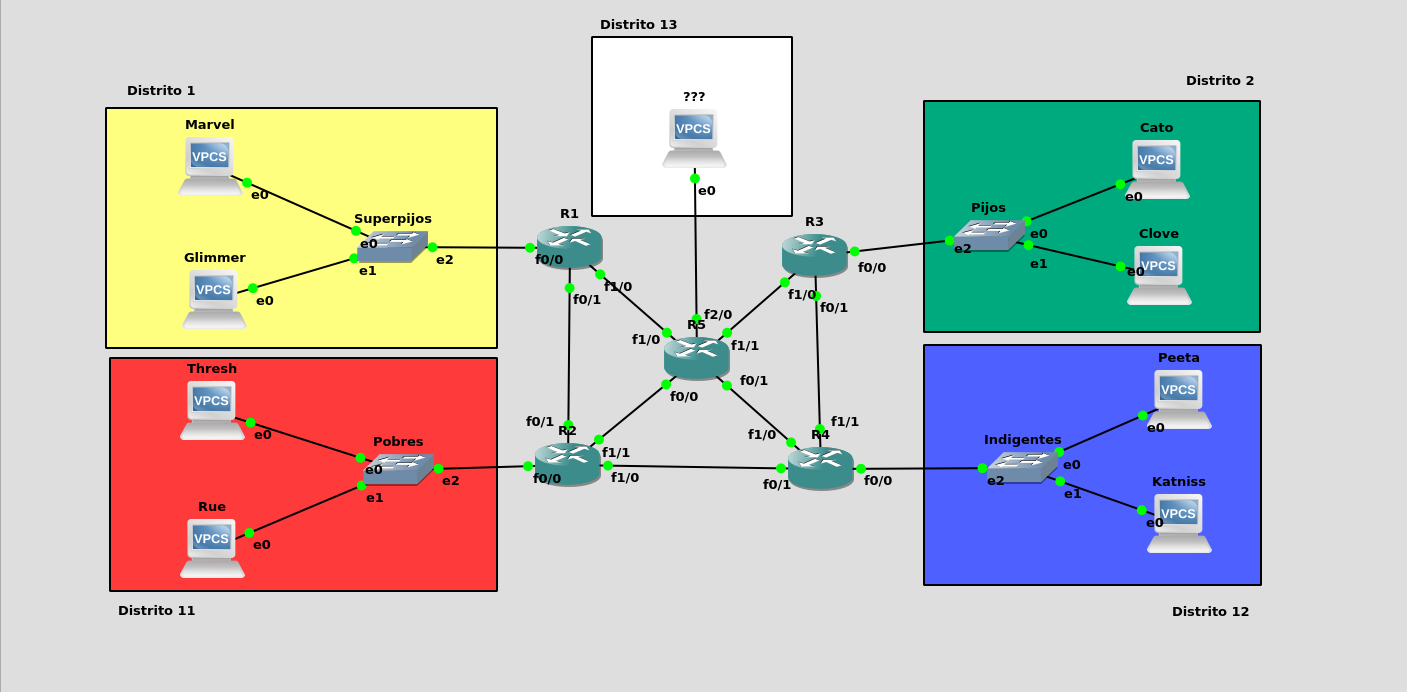
Exercise 1: Network Configuration
Perform the necessary network configuration so that all participants can communicate with each other via the shortest possible path. Document the process and demonstrate its operation.
To allow communication for all participants, first we will assign IP addresses to them and to the router interfaces along the way.
Participant IP Addresses
Marvel: 10.0.1.2 /24
Glimmer: 10.0.1.3 /24
Cato: 10.0.2.2 /24
Clover: 10.0.2.3 /24
Thresh: 10.0.11.2 /24
Rue: 10.0.11.3 /24
Peeta: 10.0.12.2 /24
Katniss: 10.0.12.3 /24
Router IP Addresses
R1 f0/0: 10.0.1.1 /24
R1 f0/1: 172.23.0.1 /24
R1 f1/0: 192.168.1.2 /24

R2 f0/0: 10.0.11.1 /24
R2 f0/1: 172.23.0.2 /24
R2 f1/0: 172.24.0.1 /24
R2 f1/1: 192.168.11.2 /24

R3 f0/0: 10.0.2.1 /24
R3 f0/1: 172.25.0.1 /24
R3 f1/0: 192.168.2.2 /24

R4 f0/0: 10.0.12.1 /24
R4 f0/1: 172.24.0.2 /24
R4 f1/0: 192.168.12.2 /24
R4 f1/1: 172.25.0.2 /24

R5 f0/0: 192.168.11.1 /24
R5 f0/1: 192.168.12.1 /24
R5 f1/0: 192.168.1.1 /24
R5 f1/1: 192.168.2.1 /24
R5 f2/0: 10.0.13.1 /24
Once IPs are assigned, we move on to router addressing.
Routing Configuration
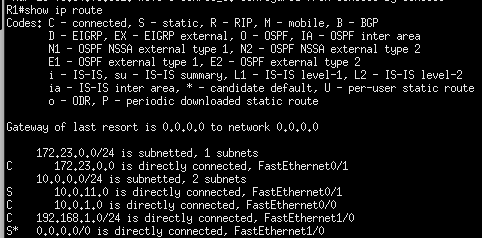
R1: If District 1 wants to communicate with District 11, traffic will go to R2; in all other cases, it will exit via default route to R5.
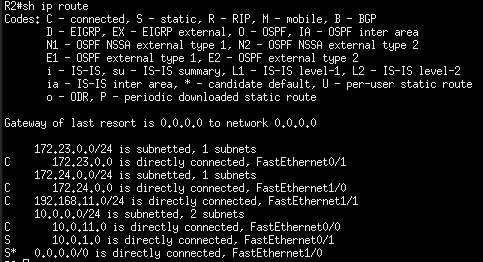
R2: Since District 13 is still unknown to participants, we will ignore its presence for routing, saving us a line in the table momentarily. Communication for District 1 will go to R1 and default exit will be to R4.
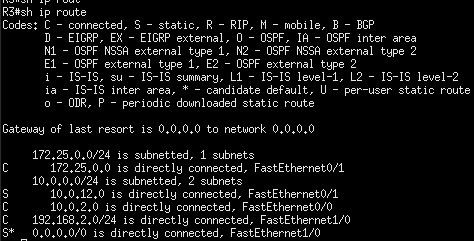
R3: Similar to R1, default exit to R5, except messages for District 12 which will go to R4.
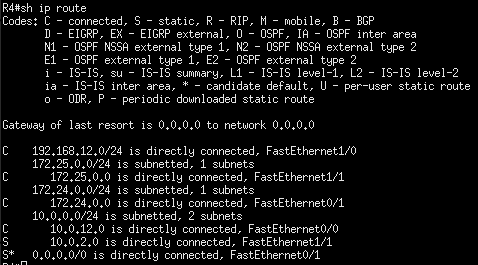
R4: Similar to R2, messages to District 2 will travel to R3, the rest to R2.
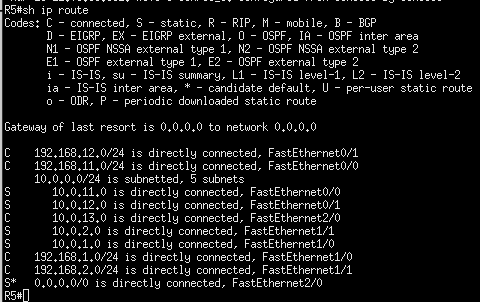
R5: In this case we must specify routes to each district. I’ll leave the default exit pointing to District 13 thinking ahead, as it won’t save us lines in the routing table anyway.
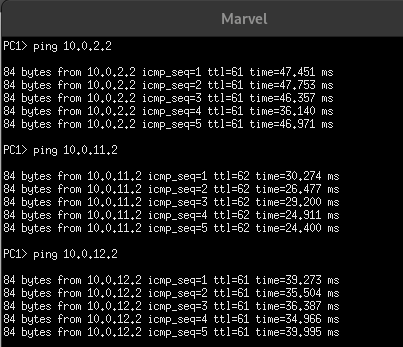
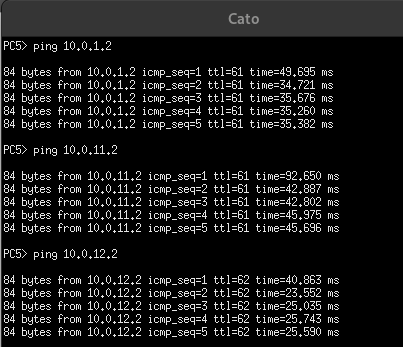
Ping Check Between Districts
District 1:
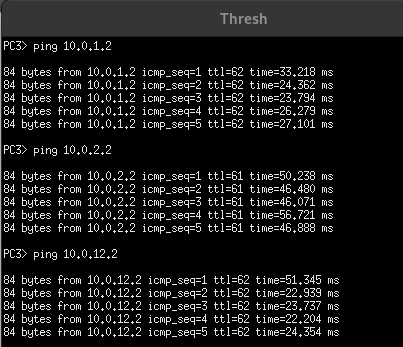
District 2:
District 11:
Exercise 2: ACLs based on Alliances
Establish the necessary ACLs to reflect the described situation. Document the process and demonstrate its operation.
As the game progresses, alliances change and therefore some participants become enemies and cease communication. Thus, on the second day the situation is as follows:
The Careers have fought with everyone
The Careers (Superpijos) have fought with everyone and do not communicate with the rest of the districts, whose messages they don’t want to hear.
For this situation we have 2 options using ACLs:
- On each district’s router block traffic destined for 10.0.1.0, requiring creation of an ACL on R2, R3, and R4.
- Cut all traffic from R1, in my opinion the most efficient and the one I will use. The downside is messages from other districts travel a longer path before being discarded by R1.
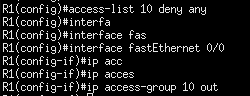
With this I have created a standard ACL on the District 1 router; all traffic attempting to exit from the switch interface will be denied.
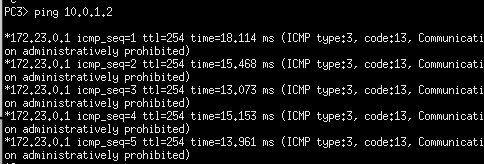
Ping from outside to District 1:
Ping from District 1 to outside:
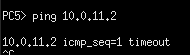
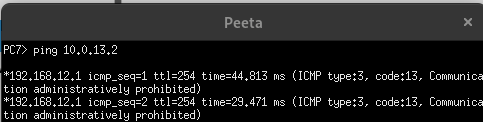
As we can see the error message is different. If we ping from a PC outside District 1 we encounter the ACL denying us passage, returning ‘administratively prohibited’. However, if we try a ping from inside District 1 the message will be timeout because communication is reaching the destination, but on return it meets the ACL which now denies passage.
The Hob and other districts
The Hob communicates with the Poor, but other districts want nothing to do with them.
We will create an extended ACL on R4’s switch interface to deny all traffic attempted to be sent to Districts 1 and 2.
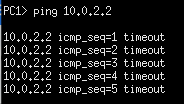
We check ping to each district from 12:
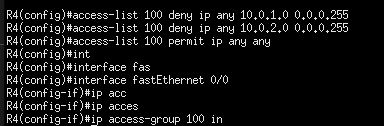
Alliance between Poor and Careers
The Poor and Careers have established a somewhat surprising alliance and can still communicate with each other, although only through R5.
Now we must modify our routing tables for R2 and R4. We will send traffic by default to R5, we will have to add the route between R2 and R4 manually.
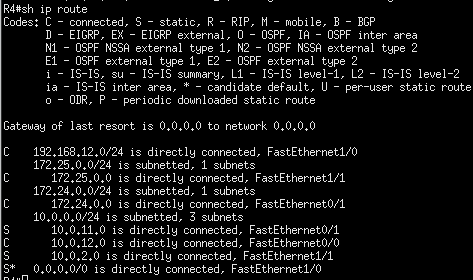
It will not be necessary to configure ACLs at this point since all communication between Districts 2 and 11 will pass through R5.
Exercise 3: DHCP Server
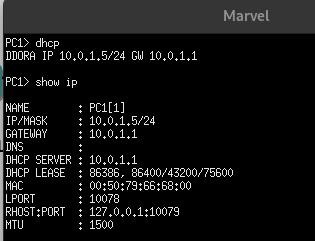
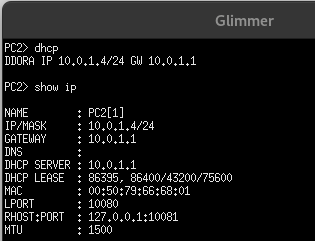
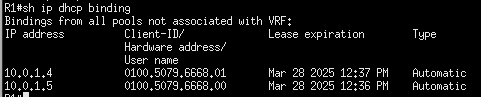
The next day, the Careers decide it’s super tiring to set IP addresses by hand, so you have to set up a DHCP server on their network router so their machines automatically receive an IP address from the first five in their address range, reserving the first for the router itself.
Configure the Careers’ DHCP server. Document the process and demonstrate its operation.
We exclude the router IP and those we don’t want assigned:

Now we configure DHCP server parameters:
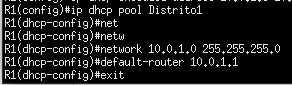
We check its operation:
Exercise 4: ACLs by Personal Relations
Configure the ACLs (extended or not) necessary to represent this new scenario. Document the process and demonstrate its operation.
One week later, alliances and enmities are no longer just between districts but between individual participants.
- Peeta establishes an alliance with Clove and must be able to communicate with him.
- Katniss stops talking to Rue.
- Katniss and Cato are starting a beautiful relationship and need to communicate with each other.
Since previously all traffic from District 12 was denied, we must rewrite that ACL, permitting the indicated communications; it will be an extended ACL.
With this:
- Katniss can only communicate with Peeta, Cato, and Thresh.
- Peeta can communicate with Katniss, Clove, and District 11.
Checks:
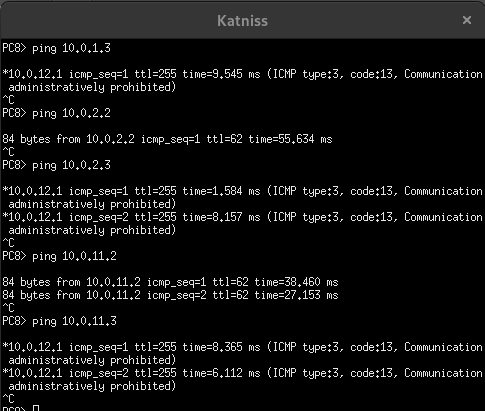
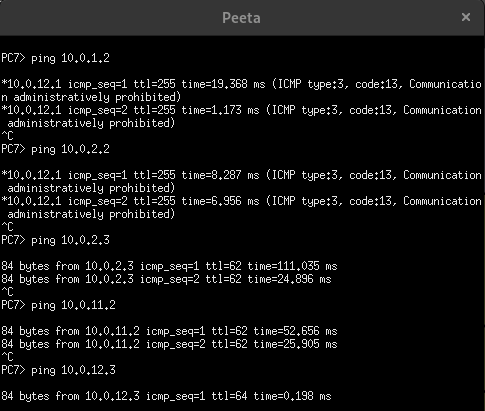
If we try to ping denied in the opposite direction we will again encounter the timeout message explained earlier.
Cato and Thresh fight
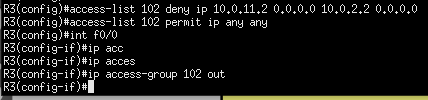
Cato and Thresh have ended up fighting and there is no longer communication between them.
We deny communication with an extended ACL, we can place it on R2, R3, or R5. In any case at least one message will have to travel through more than one router before being eliminated.

Exercise 5: District 13 Web Server
The Hunger Games are progressing and some participants have finally discovered the secret of District 13. Life doesn’t seem to exist there, but there is a web server full of very useful documents for survival.
Set up a web server in District 13 that is accessible via extended ACLs only for participants from Districts 11 and 12. Communication will be established on port 80. Document the process and demonstrate its operation.
To mount the server we will replace the VPCS machine with a Debian on which we will install Apache, we will give it access to a NAT cloud momentarily.
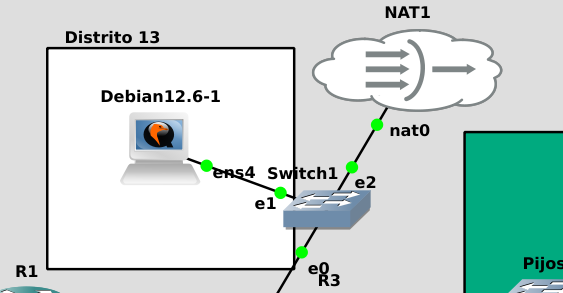
We install Apache2 and give it a static IP, we can now remove the cloud.
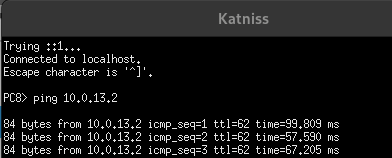
If we ping from the different machines we will see we have access from Districts 2 and 11.
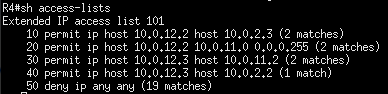
First we will modify R4’s ACL to allow access to District 12.
Since ACLs are read in order we must add the line permitting passage before ‘deny ip any any’.
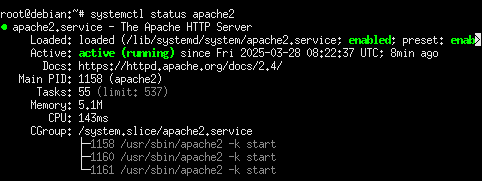
The ‘45’ will place the rule just before deny any.
Check:

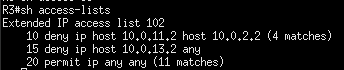
Now we deny passage to District 2 from R3 similarly modifying the already established ACL:
Check:

Now that only Districts 11 and 12 have access we will cut this to only port 80 via an ACL on R5:
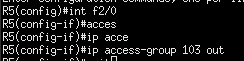
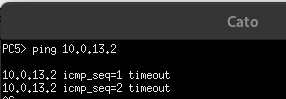
If we try to ping again we find the ACL will cut it, this is because ICMP protocol (ping) does not work on port 80.
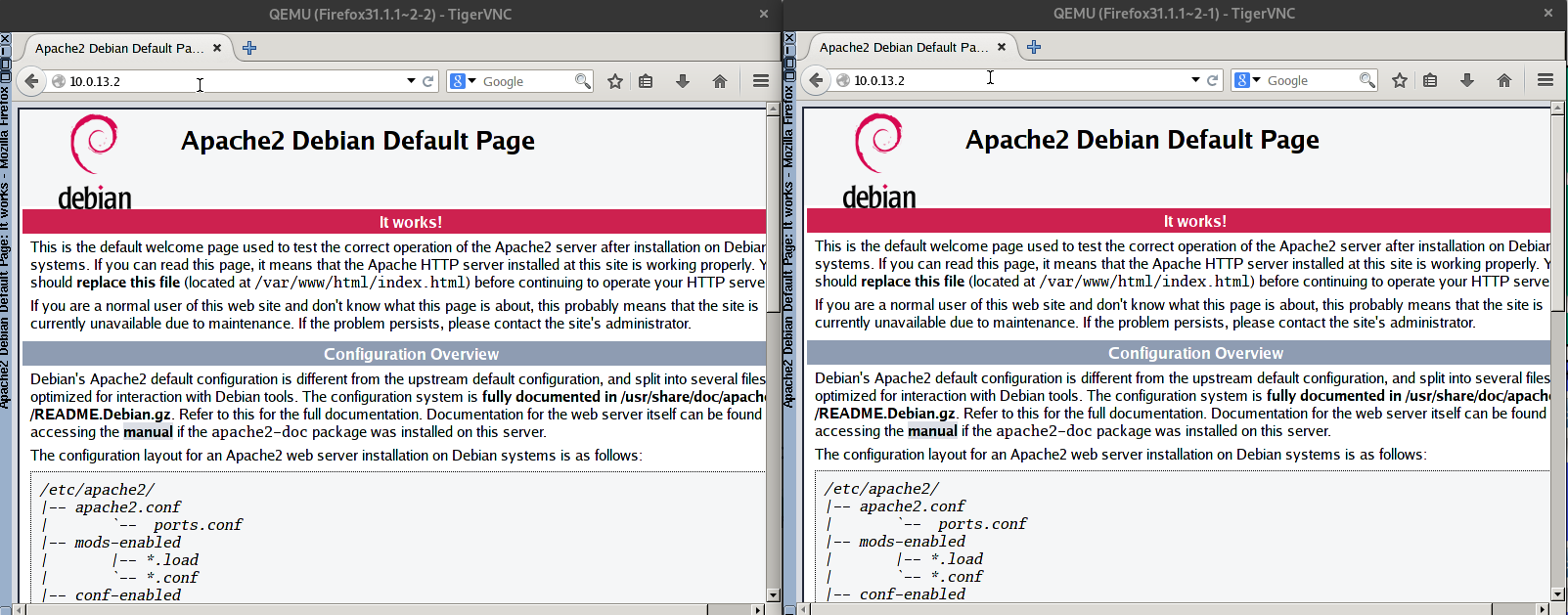
To verify the web server is accessible from Districts 11 and 12 we will add 1 tinycore with firefox to the switch of said districts.
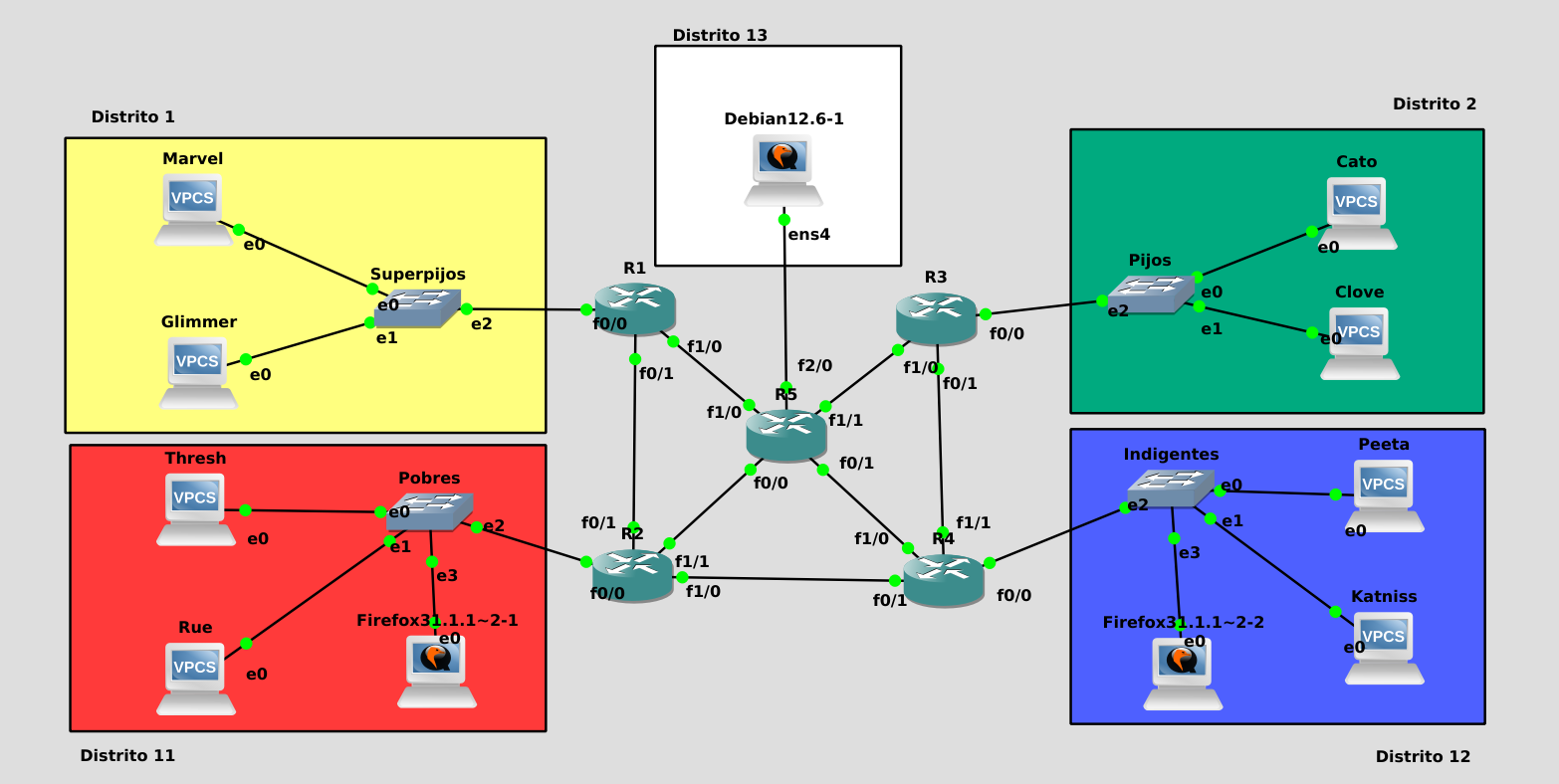
It will be necessary to configure the IP of both machines in range. Once done we can access the web server.
End of document